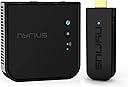




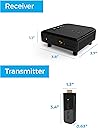
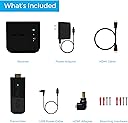
ARIES PRO
Product ID: 1152575
Details
- Audio Output ModeStereo
- BrandNyrius
- ColorBlack
- Compatible DevicesPersonal Game
- Connectivity TechnologyWireless
- Connector TypeWireless
🎥1080p 3D HD streaming
📶100ft wireless range
🔌Plug & play USB powered
Desertcart purchases this item on your behalf and handles shipping, customs, and support to Mali.
🚀 Cut the cords, not the quality—wireless HD streaming redefined!
The Nyrius Aries Pro Wireless HDMI Transmitter and Receiver delivers flawless 1080p 3D HD video and digital audio streaming up to 100 feet away, even through walls. Designed for professionals and enthusiasts alike, it supports a wide range of HDMI devices including laptops, gaming consoles, drones, and cameras. With zero latency and easy plug-and-play USB power, it eliminates cable clutter while maintaining premium signal quality. Ideal for home theaters, presentations, and live streaming setups.
| ASIN | B0092T3E3A |
| Audio Output Mode | Stereo |
| Audio Output Type | Speakers |
| Best Sellers Rank | #52,375 in Electronics ( See Top 100 in Electronics ) #261 in Streaming Media Players #15,452 in Home Theater Accessories |
| Brand | Nyrius |
| Color | Black |
| Compatible Devices | Personal Computer, Television, Monitor, Game Console, Laptop, Projector |
| Connectivity Technology | Wireless |
| Connector Type | Wireless |
| Control Method | Remote |
| Controller Type | Push Button |
| Customer Reviews | 3.9 out of 5 stars 819 Reviews |
| Format | WAV |
| Global Trade Identification Number | 00871363021793 |
| Item Type Name | Internet Media Streamers |
| Item Weight | 16 ounces |
| Manufacturer | Nyrius |
| Mfr Part Number | NPCS600 |
| Model Number | NPCS600 |
| Number of Channels | 1 |
| Number of Items | 1 |
| Other Special Features of the Product | Digital Wireless HD Transmitter, Digital Wireless HD Receiver, 1x 100-240V AC Power Adapter, 5ft. HDMI Cable, 1x USB Power Cable, Right Angle Adapter, 2x Screws/Screw Anchors, Quick Start Guide, Lifetime Customer Support, 1 Year Manufacturer's Warranty |
| Output Wattage | 5 watts |
| Software Update Supported to Date | unknown |
| Special Feature | Digital Wireless HD Transmitter, Digital Wireless HD Receiver, 1x 100-240V AC Power Adapter, 5ft. HDMI Cable, 1x USB Power Cable, Right Angle Adapter, 2x Screws/Screw Anchors, Quick Start Guide, Lifetime Customer Support, 1 Year Manufacturer's Warranty Special Feature Digital Wireless HD Transmitter, Digital Wireless HD Receiver, 1x 100-240V AC Power Adapter, 5ft. HDMI Cable, 1x USB Power Cable, Right Angle Adapter, 2x Screws/Screw Anchors, Quick Start Guide, Lifetime Customer Support, 1 Year Manufacturer's Warranty See more |
| Supported Internet Services | Amazon Instant Video, Browser, Skype, YouTube, iTunes |
| Surround Sound Channel Configuration | 5.1 |
| Total HDMI Ports | 2 |
| Total Number of HDMI Ports | 2 |
| UPC | 871363021793 |
| Unit Count | 2 Count |
| Warranty Description | 1 Year Manufacturer's Labor + Parts Warranty |
| Wattage | 5 watts |
| Wireless Technology | Bluetooth, Wi-Fi |
J**F
Transmits 3d & 1080p as advertised!
I'm using this between an Onkyo receiver and BenQ projector. The distance is 13' - 15' within line of sight (no walls). Thus far, the Nyrius Aries Pro has worked extremely well for 1080p and 3d signals, transmitting from the receiver via Roku, Tivo or a Blu-ray player. There have been no drop-outs, lags, a/v sync issues or pixeling. Setup was super easy. Basically just plugged in the transmitter and receiver and they recognized each other. The base unit automatically goes into standby when the receiver is turned off, so there's no need for manually turning it on and off. I tried A LOT of other cheaper units which either dropped signals or couldn't transmit 3d. I wasn't thrilled with the Nyrius costs, but I guess this is the price point for something to actually work as advertised.
Z**.
Runs hot but works. updated to 5 stars
Giving it 3 stars. I do not like that it runs hot. In most cases hot electronics don't last long when running hot. It worked as it should but both receiver and transmitter are really hot after about 15 or 30mins. So I gave it 3 stars since I don't think it will last and I would not be able to put the transmitter in my pocket as i wanted to/plan to.Would not to have it out in the open to try to keep it at a cooler temp. If it didn't run so hot I would for sure give it a 4. The hot temp reduces the things i can do. The monitor is used did show 1080 @60hz and also on the tv. Didn't see any lag and when I moved to a different room I did see it pixel and then switch channels once in the room. The room was the 2nd room in the house with two walls between since the transmitter was left in the living room. Sound seem in sync and didn't have any problems connecting to each other. Over all a OK wireless hdmi HD. I will update this as soon as I work with it more. Today 10.27.2016 will update in about a month. 4.7.2016 works great. went from 3 stars to 5. I have it connected from my stereo receiver to a projector. I don't see any interference. I have a wireless head phones and WiFi around it with no problems picture comes our good. power is from USB on the stereo receiver and projector. does get hot but still works with no problem just make sure it has space for the heat does not become to hot. the wireless hdmi is 13 feet from each other. I have also testes it from my living room to the master bed room watching a complete movie and also work great with no direct line of sight. very happy.planning on buying one more soon.
G**T
⚠️ Initial pairing sequence not included in startup guide!
Nowhere in the setup guide does it tell you how to do the initial pairing! The guide says just to plug everything in and the screen will transmit...I THINK NOT! *pant pant pant*. It would pair... Tried power cycling... Tried pushing buttons in different orders... Nada. Crap, did I just spend over a hundred bucks to not have to look at a cord just for it to not work? Thank goodness for the internet... The pairing link is below. You're welcome. Works as described after the stressful setup. Edit: Amazon will not allow posting a link, but go to the Nyrius support website, find your model, and watch the video on first time pairing sequence. No lag, but the picture is slightly grainy. Update to my review: It stopped working I have to return the product. It worked for 2 gaming sessions and then disconnected and wouldn't repair. Very bummed.
M**E
Great single function streaming device - excellent for the cost, scanning for quieter channels would be a plus
We needed a good reliable device to share presentations and allow for Clients to share their screens in our conference room. We originally were given a BARCO NV to test by a local vendor - although the BARCO is a great device the price point was rather high. We researched and found this for almost 1/6 of the price. The set up was easy - literally plug in the main unit to power and the TV and the dongle to our device. It is a bit of adapter hell as we work on MS Surfaces and ultrabooks which don't have HDMI ports - we had to purchase a variety of adapters (display port to HDMI, Mini HDMI to HDMI) to get them to work. Where the BARCO is connected via USB so it's powered and only needs one point of contact - the ARIES needs both the display (HDMI) and the USB port (for power) so it is a bit more unwieldy - with the adapters it's almost like a long daisy chain of parts. But the performance was great - it had less jitter and stutter than the BARCO, there was no additional downloading of apps or other software and it connected faster. To be fair the BARCO has other functions - multiple connections etc. - and this is a straight forward one function device. But it does exactly what we needed it to do - we tried it with a Dell Latitude, IPad Pro, MS Surface Pro, and a Dell XPS. Some con's are : it got very very hot after about 45 mins of streaming - hot to the point where you wouldn't want to hold it in your hand, and as expected it has a significant impact on battery consumption. We did have it "pause" or go to black screen bc of the connectivity - we're assuming it does not scan for quieter channels for streaming. Overall we would recommend it as a simple to use streaming device.
M**N
Best Wireless HDMI Solution for the Money - Cine/Pro Video Environment
We had purchased through BHPhoto a very high end WSDI system for sending wireless video from our camera rigs to a reference monitor. We also wanted to be able to use the device on multicam live productions to minimize the labor of laying cable. Needless to say, the high end ($2000 per unit) did ok for simple camera to field monitor, close range, but not so much for live events where drop outs or interference is unacceptable. So we returned the high end system, purchased these to try, and in my opinion... Its the same hardware... Just cased differently. So basically the $2000 pro cine models are nearly identical hardware, recased, and modded perhaps with an HDMI to SDI input adapter. What these are GREAT for: Sending HDMI HD 1080 Video across a room in a non-critical environment (meaning youre simply viewing, not relying on it to record or stream live). You can use it on a laptop in a presentation environment. Send HDMI from a moving camera to a reference monitor for the director to watch. HOWEVER, you really do need line of sight between the transmitter and the receiver. Even at 10-20 feet, drop outs can happen if the transmitter moves around corners, into another room, or is behind a closed door. We setup our receiver (Rx) on a C-Stand, and raise it up in the air, because even people, bodies, etc, in a crowded room can cause the occasional glitch. Line of sight, unobstructed, <30-40 feet and it works rock solid. Dont count on it for critical feed solutions, such as to a record deck, switcher, or live stream event. Run HDSDI. Also, these units dont fair well outdoors. Likely because the Rx relies on the Tx's signal from bouncing off walls. In an open space, the signal has nothing to contain the feed... So distance and line of sight become even more critical. For the money, the unit IS handsdown the best WHDMI solution out there. Skip the $1500-$3000 models from pro-video suppliers. This is the same thing. Unless youre going to drop $20,000+ on a truly pro-wireless setup, this is your unit. Lastly, in regards to delay, the image is visually delay free. Likely 1 frame behind... which isnt noticable to most people. However, if you run this in a setup where other gen-lock sync events occur, that 1 frame (plus other 1 frame delays introduced by other hardware) may become an issue.
S**Y
10 stars, out of a possible 5
The Nyrius Aries HDMI transmitter/receiver pair *totally* solved my TV (49" LG) hookup issue to a FIOS cable box. I wanted to watch TV in a room that has foot traffic, but that room has large windows&walls that made it nearly impossible to fish through a cable. I was hoping to find some sort of transmitter/receiver solution. My audio/visual expert neighbor said my hoped-for solution was impossible, or at least not on the market. But the Amazon description of the Nyrius Aries HDMI seemed like a perfect solution. HDMI connections imply simple hookups, especially important for TV mounted on a mobile cart (so a minimum number of trailing cables is helpful.) Which Nyrius Aries version to get, the 25 or 100 foot? My cable box is about 20 feet away from the TV. But my FIOS cable box is in an adjacent room, so I figured that transmission would be further attenuated by two layers of sheet rock plus a solid wood panel. So I chose the 100 foot version. Using the included USB power supply, the setup worked perfectly. The package includes a right-angle HDMI bender adapter, which I very much appreciated, solving the issue of my cable box in a tight space, with little depth behind the cable box. But there's more happiness to the story! I was a bit annoyed that the Nyrius Aries receiver requires 2 amps, and thus a beefy USB power supply that you can't draw from the built-in USB port at the back of my LG TV. A 2 amps supply requirement for the receiver is double the supply requirement for running the transmitter! That specified ratio doesn't make sense to me. Being a natural skeptic, I measured for myself my Nyrius Aries receiver's actual current draw, which was only .09 amps, not the claimed 2 amps. Therefore one might expect that my TV would easily provide the necessary power for the Nyrius receiver. So it was worth a test, which proved that my TV's built-in USB power source did indeed supply enough amperage. I thus found no need for the (included) separate beefy USB power supply. All I needed was to connect a USB-to-mini cable from my TV USB port to the Nyrius receiver. In other words, my TV's light-duty electricity cord (or simple extension coord if you need more length) is now the only cable of any sort between my TV and the wall. Tip: I securely mounted my Nyrius Aries receiver unit directly on the back of my TV, using 3M Command brand "Mini Clips", which fit perfectly into the two keyhole slots thoughtfully molded underneath the receiver unit. You'll have to break off the Nyrius receiver unit's rubber feet stanchions, no problem since the stanchions easily fall off anyway. Not important to me: a) It's possible that the resulting picture quality isn't as perfect as from a traditional coaxial cable hookup (even though my Nyrius Aries system is reporting that I'm in HD 1080 mode,) but maybe that's only when I'm critically looking closely at the screen from a few inches away. b) I purchased an IR cable box extender device for ~ten bucks, then fed its simple thin cable through a wall, so that my FIOS remote control clicker will command the set top FIOS cable box located in a closet in adjacemt room. Talk about a minimalist overall implementation, way beyond my expectations. Am extremely happy with the Nyrius Aries HDMI transmitter/receiver product.
P**P
Not a true uncompressed HDMI signal
I spent a lot of time looking into WHDI devices like the Nyrius ARIES series. I was really impressed with all the good reviews. Unfortunately, I found the product to be misrepresented in marketing materials and the picture quality to be completely unacceptable for my purposes (cloned laptop display). The problem is that Nyrius likes to claim their signal is "uncompressed." This is misleading. The fact is, this device does not transmit a full unmodified 1080p signal. There's very little information on this online besides the common claims that the video quality is "Perfect" (source: whdi.org), "Uncompressed" (source: this product page), "lag-free" and so on. But nobody will claim it's exactly the same as an HDMI cable, because it isn't. After much digging I found that WHDI technology "prioritizes areas of visual significance" while giving less priority to others. Ultimately this means WHDI is using a motion estimation/detection algorithm just like any other video compressor. The difference is that they simply drop information rather than encode it into some other format, which would have more potential to introduce lag. To me this means the signal is compressed, but if you want to get disingenuous I guess you can claim it isn't since there's no format conversion going on. I always thought "compression" would mean taking a signal and making it fit in a smaller amount of bandwidth, which is what is happening here, but marketers really like to invent their own definitions for words. For the technically minded, you can read more about WHDI's "totally not compressing anything" motion-estimation and prioritization algorithm here: [...] To see what I mean, hook up a computer of some kind (I used a Mac Mini) and drag some windows around. In my case I had the transmitter and receiver within 2 feet or less of each other, and the built-in signal strength meter on the display indicated full quality. When any amount of motion is displayed on the screen (dragging a window would be an example of "high motion" for the purposes of video encoding, at least the way WHDI does it) there is severe visible artifacting taking place. When hooked up over a straight high-speed HDMI cable, this artifacting is of course not present at all. I double-checked that I had turned off my 5Ghz wireless router just to make sure it wasn't interfering. Picture quality (during motion) was still unacceptable and not at all close to the performance of a normal HDMI cable. All that said, if you just don't care about top-notch visual quality and you just want a functional wireless video setup, this will work. It may be reasonably OK for TV/Movies, as many have attested. And the out-of-box experience was certainly extremely easy and it worked immediately. But if you are trying to solve a wiring problem I might suggest looking into HDMI-over-Cat5/6 baluns if it's an option for you. You can do a lot better than this solution.
D**P
Not as good as everyone says...but
Well I am both pleased and disappointed with this unit, partly though because of where my HDMI out is located. The HDMI out is on the side of my laptop and the transmitter will not fit horizontally without blocking one of my USB ports. Therefore I have to use the angled HDMI (included) adapter which makes it fit nicely and it also stands the transmitter upright. I figured that was great until I tried to type on my keyboard. The reason is that it makes it very awkward to type as the transmitter crowds the left side. So I now need to remove it if I want to type, such as writing this review. Of course if you have your HDMI out on the back of your PC then you will not have this issue. I also had trouble getting sound to work. The instruction manual is vague on this and it was only after reconnecting it a few times that I realized that there is a separate audio device showing up in my Windows 7 sound via the control panel. Once I selected that I then had sound. You will have to power off the transmitter for Windows to automatically switch back to the main sound source or you would need to switch it back yourself. Customer service was so slow to answer my question on this that I had already figured it out, and it is worth noting that they had the wrong fix for this issue. Another thing that disturbs me is security as this unit transmits in the Gigahertz range and anyone with the same unit could technically receive your transmission. Now that may be a bit silly, as the range would mean that someone doing it would have to be really close. Still...I would be careful what you transmit, such as passwords being entered, or looking at bank documents. or any other sensitive data. After all this is a virtual desktop. Still yet another gripe, although a minor one, is the receivers hookup. The cable for the power supply is really short which is fine if you have the unit mounted toward the bottom of the TV. In my case I wanted it near the top for better reception and so I cannot route my cable as cleanly as I would like. The image comes across darker than watching it on the PC and I am not sure why. The TV over-the-air signal on my TV(1080i for HD OTA)is great, but playing it back through this unit (via ABC ect)on my PC ...is more like 720P. Oh...there is latency too, although not unbearable. And I do have a very fast internet connection. I also cannot seem to turn off the receiver without unplugging it...as there is no way to power it off that I can see. So it flashes all the time when the transmitter is not transmitting. Another source of vampire power drain...which is not cool. The unit is nice as it still beats hunched over on my laptop watching a TV show rather than seeing it on my 55 inch TV and in my favorite chair. And it seems the only way that you can watch shows off the players on ABC, NBC ect..and doing so is free. Also...being able watch YouTube videos in full screen is nice. I am getting a wireless keyboard to make it easier to use. Now excuse me...I need to catch up on the Grimm episodes that I have missed. :) Update: 7/1/13 Well after using this for a while I have come to like it more and more. I finally figured out how to get my TV to display the full screen my laptop has. The resolution was never right and I had to minimize my PC (a Toshiba) and the re-size it to get it to fit. I played around with my graphic properties and set it so that the TV was the only display, not having my laptop screen active. I then used the wizard of the Intel Graphics control panel (right click and properties)and then selected (under scaling)customize aspect ratio... I played around with the slider scale and now I have a full screen (55 inch display) of my desktop, just as on my desktop that fits my TV perfectly. Also, I really like using it as my PC...very fun. I got a streaming plan with Netflicks and it is working very well, with a nice picture. My Iogear wireless keyboard makes it all click.
Trustpilot
5 days ago
2 weeks ago