Desertcart purchases this item on your behalf and handles shipping, customs, and support to Mali.
🚀 Elevate your home network to pro-level speed and control!
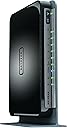
The NETGEAR WNDR4300 N750 Dual Band Gigabit Router delivers up to 750 Mbps combined WiFi speed with simultaneous dual-band technology, ideal for medium to large homes. Featuring 4 Gigabit Ethernet ports, USB sharing capabilities, IPv6 compatibility, and intuitive app control, it ensures a fast, reliable, and future-ready network experience.


| Antenna Location | Gaming |
| Antenna Type | Internal |
| Asin | B008HO9DK4 |
| Best Sellers Rank | #36,375 in Computers & Accessories (See Top 100 in Computers & Accessories) #957 in Computer Routers |
| Brand | NETGEAR |
| Built In Media | Ethernet Cable, N750 Wifi Dual Band Gigabit Router, Power Adapter, Premium Feature Booklet, Quick Start Guide |
| Color | Black |
| Compatible Devices | Printer |
| Connectivity Protocol | ethernet, wi-fi |
| Connectivity Technology | wireless |
| Control Method | App |
| Controller Type | vera |
| Coverage | Large Homes |
| Customer Reviews | 4.2 4.2 out of 5 stars (3,577) 4.2 out of 5 stars |
| Data Transfer Rate | 750 megabytes_per_second |
| Frequency | 5 GHz |
| Frequency Band Class | Dual-Band |
| Global Trade Identification Number | 00606449084528, 30606449084529 |
| Item Part Number | WNDR4300-100PES, WNDR4300100PES |
| Item Weight | 448 g |
| Lan Port Bandwidth | 10/100/1000 (Gigabit) |
| Manufacturer | Netgear Inc |
| Maximum Upstream Data Transfer Rate | 750 megabits_per_second |
| Mfr Part Number | WNDR4300-100NAS |
| Model Name | WNDR4300 |
| Model Number | WNDR4300-100NAS |
| Number Of Ports | 5 |
| Operating System | Windows 7, Mac OS |
| Other Special Features Of The Product | WPS |
| Security Protocol | WPA/WPA2—PSK,WEP |
| Unit Count | 1 Count |
| Upc | 606449084528 |
| Warranty Description | 1 Year Limited warranty |
| Wi Fi Generation | Wi-Fi 4 |
| Wireless Compability | 5.8 GHz Radio Frequency, 802.11a/b/g/n |
User
Awesome
This is a great router. It replaced an older Netgear router that was in the process of dying, and the change was amazing. If you're on the fence, go ahead and get it.This router is EASY to set up. I ran through the guide quickly enough, changed the SSIS and access paskeys, and was off and running. the signal is strong and reliable, and covers the house quite well, and the signal extends outside onto the deck and yard nicely enough.The router comes with a family protection feature that allows you to set up an account that will check and filter every request going through the router, both on WiFi and through the ethernet. Nothing is fool proof, but it provides a great layer of protection for our family.We have a "Micro-Cell" signal booster from AT&T. We connected it to a port on the router's ethernet, and it receives a strong, reliable connection to the internet. I've connected an external hard drive to a USB port, which makes the drive available on our network, which is handy when we're at home. Its great having a shared drive for pictures, songs, documents and other files we like to share. I haven't used the "cloud" feature, but I'm planning on getting a bigger drive and hooking that up as well. I doubt it will be too difficult, but I can't speak to that yet.In addition to the MicroCell, I typically have 2 computers wired on the Ethernet, 1-3 laptops (including work laptops connecting through VPN - without difficuty), 2 kindle fire's, a windows tablet, a windows phone and an android tablet and phone. Everything can be connected at once, and it works just fine. We've had study groups over, and they connect their phones, tablets, and computers to the Wi-Fi as well. I'm not sure how many concurrent connections it handles, but we haven't capped out yet, so it seems it is more than 10 or 12.I have a 'normal' sized 3-bedroom split-entry house, and this router adequately covers the house, although I did get a signal booster to increase the speed in the back bedroom. The bedroom, however, is on a different floor, and the signal travels through not only the floor, but the stairs and a couple of walls. It makes it, but with the signal booster at the top of the steps, there's improved bandwidth in that back corner. I'm sure if I centered the router better in the house, I wouldn't need it, but the way its laid out, putting it in the middle would be awkward, so its off to one side.I'm VERY glad I picked up this router, and I heartily recommend it.
User
Great range and speed for my house.
I have a 2,000 sqft house and a UVERSE 3700 modem with built in G WiFi that had a very weak signal when not in the same room as the modem.I decided to upgrade my WiFi with this N, Dual Band router and so far it has been consistent and powerful. I get plenty of coverage in the far reaches of my home (went from fluctuating from 1-3 bars constantly to a STEADY FULL BARS in the far rooms with an occasional 3. It never drops to less than 3 which is exactly what I wanted in a new, powerful router!).SETUP:Setup was a breeze. Plugged it in, changed the WiFi name and network in the router settings via my laptop, and picked a channel that had the fewest interference in my area (this was optional, but I've been told it can help with your WiFi signal and it was easy to do in the settings menu). Worked perfectly.TECH SUPPORT REVIEW:I did try to be more advanced with the router than I should have.... and it caused me a headache and some troubles. I read online that adding a WiFi router to my existing modem wasn't easy and needed some more intensive, advanced setting changes.After bricking my router (blinking lights, no WiFi, and the factory reset option I Googled didn't seem to work) trying to change these settings, I was forced to call Netgear tech support. After about 5 minutes at home at 11:30 at night, I was connected to a tech that, while he had a strong accent, we were able to clearly communicate and he was very knowledgeable. He walked me through how to do a proper factory reset (I don't know why this wasn't in the online manual or in any of the included printouts) and presto, we were up and running perfectly after about a 20 minute call. Not bad.SUMMARY:Ease of setup, my experience with tech support was positive. Strong range and speed to the extremes of my house (your hours and results may vary, of course). Hopefully, like all products, it serves me well for a few years and i won't have to reboot or reset often..
User
Perfect! But the Genie interferes with advanced setup
The speed is NOT the 750Mbps stated, as when you max out both the 5GHz and 2.4GHz they are crossing channels, thus reducing it by 150Mbps. The router clearly states this when configured, and pops up the information so you are aware. you can effectively get 600Mbps.Easy set up for a generic user, but a little skill is still needed to understand what you are looking at if you plan to change the default settings. Works right out of the package for most home users, and the Genie will walk you through the rest. Even included a shielded color coded cable for the main data line.For those of us who have an advanced setup: Does not report to Sophos UTM, but the traffic is easily visible when manually configured in sophos. The netgear refused to accept the correct static IP's for my network and kept resetting DHCP range to 172.x.x.x/20 (not sure why it picked a class B network but it did) and the WAN to a 10.0.0.1 despite being set without DHCP or a NAT. This was resolved by looking in the advanced setup after being VERY annoyed and getting a headache, and finding the "Configure as an AP" setting, which released the genie from the settings and allowed manual configuration. Using this shuts off all router processes and it acts as a pure AP with a switch built in, perfect for my uses but may be a problem in your environment. I recommend you look at advanced functions FIRST instead of just configuring it how you want, or the genie will reset your work to the router defaults. On a side note, it does not always inform you that it reset your settings, but you find out when nothing works.I have had this for about 4 months, and have yet to see any major problems with the WiFi other than the occasional glitch that requires a reboot (only a few times, and most often during network configuration). I am observing the device carefully and will IMMEDIATELY contact netgear for a replacement if the WiFi stops bradcasting at either 2.4 or 5GHz.
User
Family of 5 - connects our devices in our ranch-style home and we don't have to continually reconnect!!
I am reviewing NETGEAR N750 Dual Band 4 Port Wi-Fi Gigabit Router (WNDR4300)First of all I would like to point out I purchased this from the Amazon Warehouse Deals. I am sure it was a used item and will review it as used, not as a brand-new item.Packaging 5/5: the product box had a hole in it but did not damage the product. It was sufficiently taped shut and appeared to be the original box. There was an Amazon Warehouse Inspected sticker on the top of the box which did give me some comfort knowing they knew the contents of the box and were willing to put the "Amazon" name on it. Once inside, there was a cardboard form that appeared to be original. There were four pieces included: the router, a stand, a cable and the plug-in cord.Product exterior 4/5: as a used unit it did have some scratches on it and a light amount of dust, which easily washed away. Nothing was broken and the important pieces were there and in tact. The cables fit snuggly in the ports.Instructions 5/5: There were no printed instructions included in the box but the outside had some good information. Putting the stand on the unit was pretty intuitive and tooke me less than 30 seconds to figure out. I got it hooked up to my computer very quickly by swapping out my current router and just plugging the cables into the appropriate ports. When nothing popped up on my computer to set up the router but just auto-connected to the internet, I was a little flummoxed on how to get the wi-fi password for my wireless devices. Also, I wasn't exactly sure what the name of the router was in my list of devices. I found a website on the bottom of the router and went there. I found the router name and wifi password on the website (and was able to update/change as needed). So all-in-all I was set up in about 5 minutes. Super simple!Overall impression: I NEEDED a new router. I couldn't go 3 minutes on my devices without needing to reconnect to my decades old router and sometimes the range wouldn't even reach to my basement or my bedroom. I have a small ranch-style house. I picked this one because it seemed middle of the road - I only needed to connect a few devices and a pc. We don't game or anything but wanted something reliable and able to stream a few movies with and you know... actually read through our Facebook feed without interruption. I liked the warehouse price point for this router - it was within my budget and I felt I was getting a better unit used than what I could get for the same price off a retail shelf. I was right. I haven't had to reconnect to the router once and I've only had it hooked up overnight. I am SOOO happy for that! My phone had full range in both my bedroom and the basement! It reached far. I am happy with how simple it was to hook up and how well it is working with all of our devices. Now my kids can watch youtube videos and I can stream some AmazonPrime videos at the same time and we're not fighting each other for a connection!! YAY!I am very happy with this purchase!
User
Have to reset weekly only after 5 months of use - DO NOT BUY
I purchased this router in September 2013 based on the reviews. Of course there are always bad reviews, but you have to compare those to the amount of good reviews. It ran amazing once installed, great speeds, decent range, and no dropouts - UNTIL FEBRUARY 2014. I woke up that morning to no wireless access. All of the lights indicating wireless service were on but no wi-fi. I checked the internet signal from the cable modem and it was fine. I reset the router, and everything was fine. HOWEVER, the next week, the same thing happened, I lost the wireless. A week later, I lost the wired signal - that was the last straw. I filed a complaint with Netgear, and had to go back and forth in emails about eight (8) times over 2 weeks before they shipped me a new router, but on top of that made me pay for shipping!I hooked up the new router (same model), and two weeks into use of that one, it also dropped its internet connection!!! Are you kidding me????? Reset it and it worked again. I called Netgear and was upgraded to level 2 tech support. They uploaded new firmware, hoping that was going to correct the problem. Well, here I am again, waking up this morning to no wireless internet. I reset the router and everything worked fine. WHY DO I HAVE TO RESET THE ROUTER ONCE A WEEK TO KEEP INTERNET SERVICE? My previous router was a Netgear N300 which lasted 3 years - I only replaced it to get more speed as my needs changed, so I know its not my internet provider that is giving me a problem. And I use Optimum as my ISP and have a 101 Mbps account, so speed is not an issue either. At this point, the $91.00 I spent on this router is not worth all of the emails I have had to send back and forth to Netgear, and the hours I have to spend at home to troubleshoot this on-line with the technician. As of 4/6/14 I am waiting for a call back from level 2 support to see what they are going to do now. I have asked multiple times for replacement to a different model and they won't do it.So I am here on Amazon to inform everyone DO NOT WASTE YOUR TIME WITH THIS MODELl. And Netgear, when you read this, you can look up my current case, its case # 22968411. I have asked multiple times to have this router replaced with a comparable model, but they keep trying to replace/fix it, but it is still frequently dropping the connection.I will be shopping for other manufacturer's models after this and won't be shopping with Netgear ever again.
User
Instant Improvement --- Great Router!
I bought this wireless router for our family as a much needed improvement to our old wired D-Link EBR-2310 router. We were experiencing drop-offs while browsing the Internet both at high-traffic and low-traffic times. After doing some research, we realized it was the router that was causing all of the issues.Our current network structure consists of a majority of Powerline networking throughout our household, with one cable modem receiving the Internet connection. In order to upgrade, we wanted to stay away from wireless routers, but wired routers are, for the most part, extinct now. When choosing a replacement, I came across this router. The feature that caught our attention the most was the Wi-Fi On/Off Button. Since we did not want to use wireless transmission in the house, this was a perfect wired solution.The installation of the router was quick and easy, and I did not experience one problem in setting everything up. We have one computer that is physically connected to the router (with the rest on the Powerline network), and the changes were instantly noticeable. Before, we would have to wait for pages to load, refreshing multiple times. Now browsing was much more fluent and a lot faster. The router also has an advanced QoS system, which was evident in streaming videos. We could stream 1080px videos on YouTube without having to wait for buffering every 5 seconds. In terms of the Powerline network, improvements were also noticed. While the download/upload speeds did not necessarily change, there was no hesitation in browsing.Netgear has an application called Netgear Genie, which allows for network management in a simple interface. The dashboard is clean and crisp and makes adjusting settings simple. You can even monitor traffic, set parental controls, and see a network map to identify if any unknown devices are using your network.While my family and I have only been using the router for a couple of days now, we are extremely pleased with the performance of this router.Note: The Internet download speeds that we receive from our provider are around 15 Mbps.
User
Great signal, great bandwidth, great range
I bought this to replace my Netgear N300, and the difference is like comparing a Maserati to my car (not a Maserati). I never had any deal-killing issues with the N300. It did its job in my room, but outside of that the performance dipped. On a 50 mpbs down/ 10 mbps upload plan through Comcast, the N300 would give me 52/14 in my room, and about 15-18 down /11-12 up in my living room. Keep in mind, I do understand the internet the router is able to send out all depends on my modem. My modem does its job well.The signal the N300 sent to my living room was pretty strong, but the bandwidth was slow compared to what I got in my room (which I know is normal). I was able to get a strong signal with the N300 outside of my apartment, but the wifi wasn't usable at times. I'm such a layman when it comes to wifi technology. While I was researching on my next router, I wasn't sure how to ask if longer range translates into more usable bandwidth (more Mbps), or if it just meant you had internet further away from the router. I'm still a little cloudy with my understanding.ANYWHO, the Netgear N750 sends a strong signal into my living room and waay more mbps. My living room now gets around 35-45 Mbps down and about 12 mbps up. THAT'S what I was looking for. I also have all of my short range wifi devices connected to the 5Ghz network. Beware, in general the 5Ghz network is very strong, but very short ranged. Where ever it gets the signal to, you get almost as much Mbps as your modem can manage, but the signal doesn't go far. Also, not many of my devices have 5Ghz wifi radio adapters. Just my phones and my Roku. My PS4, printer, and surprisingly my laptop are not 5Ghz wifi enabled. Boo.
User
It was time to upgrade our old Wi-Fi wireless router!
My search for a reasonably priced, vertical standing Wi-Fi unit, with the latest wireless security, found Netgear. Since I don't need the very best, as this is only used for Wi-Fi - wireless devices, the Netgear N750 looked promising! We have a D-link DGL-4100 hardwired gigabit LAN for our main devices.The pros:+ Reasonable priced, brand new, at $45 with free Amazon shipping when I bought this.+ Lots of customer product reviews & answered questions.+ The Netgear genie does a pretty good job setting up the system. It detected our existing D-Link DGL-4100 router & suggested setting the Netgear N750 as a wireless AP - access point.+ The 5 GHz Wi-Fi - wireless is much faster than the 2.4 GHz wireless on our old Wi-Fi router!+ The 2.4 GHz Wi-Fi - wireless can be turned off, to save power, if you don't need it.+ Advertised - Wi-Fi speed 300 + 450 - up to 750Mbps+ Advertised - Wi-Fi range for medium to large homes+ Advertised - 1 CPU, DDR3 SDRAM: 128 MB, flash memory size =128 MB.+ Advertised - wireless type: 802.11 a/b/g/n+ Advertised - secure Wi-Fi connections - WPA/WPA2.+ Advertised - wirelessly access and share USB Hard Drive and Printer+ Advertised - simultaneous dual band 2.4GHz & 5GHz.+ Advertised - broadband (cable, DSL) Internet service and modem with Ethernet connection.+ Advertised - multiple HD video streaming, multiplayer gaming, secure and reliable connection to the Internet.+ Advertised - double firewall protection (SPI and NAT firewall).+ Advertised - item Dimensions: L x W x H, 5.86 x 2.99 x 9.21 inches.+ Advertised - weight: 15.8 ounces.+ comes with a 5 foot Ethernet cable, 12 VDC, 1.5 A switching power supply & basic written setup instructions. The complete user manual can be downloaded in PDF format. ◄ The Ethernet cable was too short for our application.The cons:+ Advertised - color = black. ◄ Shiny black that will get covered with fingerprints & will scratch easily!- Made in China. ◄ For those that prefer to buy products made in the USA.- Support limited to 90 days from the date of purchase. you have to register to get this 90 day support.- When positioned vertically, this is recommended for the best Wi-Fi - wireless coverage, it can only sit one way. One side (left) is the top & it looks nice. The other side (right) is the bottom & it's butt ugly!- No Wi-Fi activity LED. ◄ What's up with this? How can you tell if there's Wi-Fi - wireless activity?- If the N750 is set as a Wi-Fi wireless AP - access point, the "internet" LED will never change to green, it will stay amber (yellow). ◄ Another annoyance, as this "normally" indicates you don't have a connection to the internet!- In normal operation, our N750 has 4 lit LED. None of the LED "blink" to indicate "activity", they are just lit. It would be nice, especially with the Wi-Fi, if that LED would "blink" to show Wi-Fi activity! ◄ Yes, another curious design flaw!Closing remarks:▪ Netgear support was not very helpful & are slow to respond. VERY annoying, poor technical support, in my opinion!▪ Came with firmware v1.0.2.80, updated to v1.0.2.104.▪ When the N750 is set as a wireless AP - access point, all the hardwired devices on our existing LAN are visible & accessible.▪ If the wireless AP - access point is not enabled, ONLY the hardwired devices connected to the N750 will be visible & accessible. Anything connected to an existing router will not be visible or accessible!Pictures:▪ The first picture shows N750 set as a wireless AP - access point. Note the amber (yellow) internet LED! This is how our N750 is setup & it is working perfectly. The amber (yellow) LED would seem to tell you the internet is not connected, but that's NOT the case!▪ The second picture shows the N750 with the wireless AP - access point disabled. Note that that the internet LED is green! This is the router + WiFi -wireless setup.
User
Diseño elegante y administracion eficiente
Es muy sencillo de configurar, las bandas duales funcionan muy bien, el rango de mi wifi mejoro notablemente. Lo malo es que no lei bien y pensé que manejaba el Qos independiente para cada dispositivo limitando el ancho de banda. En general muy buen equipo.
User
Muy buen router
Lo llevo utilizando algo más de un año y nunca ha dado ningún problema, es rápido, estable, ligero, y de bajo consumo.Lo tengo conectado en el salón de casa a un extensor de conexión por cable a través de la corriente (TP LINK ASIN: B00ADW9R22) desde el router principal Telecable que está en otra habitación. Con la peana vertical, detrás de la TV no ocupa casi espacio.Proporciona dos nuevos puntos Wi-Fi (2,4 Ghz y 5 Ghz) para conectar smartphones, tablets, portátil... y 4 puertos Gigabit 10/100/1000 donde tengo conectados el deco de Telecable, la Xbox One y una Samsung Smart TV.Todo lo que necesitaba en mi pequeña red doméstica. Fantástico.
User
Fantastic Router!
My previous router Netgear JNR1010 had served me well for 3 years. It is a very basic and cheap router. It worked very well. As the wireless connections increased to more than 3 devices, internet disconnection became the norm! For months, I would reset the router every 15 - 20 minutes to restore the internet without knowing what the real issue was. I thought it was an ISP problem. Finally I figured out that this basic router couldn't handle those multiple connections. So I've decided to buy one that could handle all those connections.I zeroed in to this router after reading some tech reviews that gave positive feedback on this router. Setting up the router is very simple. Once you connect any device (wireless), the device will open the Netgear page or you can manually type routerlogin.net in the browser to access that page. Then you have to simply choose the setup options it displays. The default password will be at the router's bottom. You can change that password within the options. Once everything is done, the WIFI is set. This entire process takes only a few minutes.This router is really good! I live in a first floor flat that is about 1250 Square Feet. This router's range is more than enough to cover the entire flat. I was also able to access the router 30 - 35 meters away from the flat. For a home user, it's range is quite powerful. Multiple connectivity is awesome. This is a dual band router that enables the usage of 5 GHz band for watching videos, which will ensure trouble free streaming. The other 2.4 GHz band can be used for general browsing. This router also has an USB port through which an external HDD or a Pen Drive can be connected and then accessed via WIFI. It's a nice feature and gives you the option to access additional storage. This router is wall mountable! It can also be set up horizontally or vertically on the surface.This router doesn't support BEAM FORMING technology. Unless you work at home or you do some seriously important stuff, you will not need this new technology. This technology costs a few thousands more than the old technology. All that extra money can be saved with this router. Besides BEAM FORMING technology can cause much more exposure to high RF as it concentrates the signals onto the connected device. As I said before, go for this technology only if you really need it. In a sentence, this is the best router in the market sans BEAM FORMING technology!NOTE: There will be some differences if the unit is an import.
User
Reliable, Great Range
Nice reliable router, good range, like the user interface and options
User
Perfect Product
This product could not have been any better.
Trustpilot
3 weeks ago
1 day ago