


⚡ Power your savings with precision and style!
The P4400 Kill A Watt Electricity Usage Monitor is a portable, highly accurate device that measures electrical consumption of 115V AC appliances. Featuring a large LCD display and four selectable time frames (day, week, month, year), it provides detailed insights into volts, amps, and wattage with 0.2-2.0% accuracy. Ideal for professionals seeking to optimize energy efficiency and reduce costs, it supports inverter compatibility and requires minimal setup.


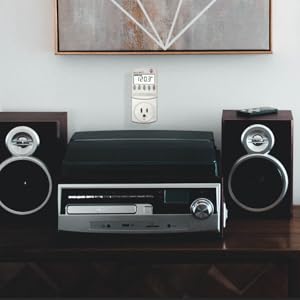
| Manufacturer | P3 |
| Part Number | P4400 |
| Item Weight | 5.6 ounces |
| Product Dimensions | 8.4 x 2.1 x 6.1 inches |
| Item model number | LGP4400 |
| Batteries | 1 CR123A batteries required. |
| Is Discontinued By Manufacturer | No |
| Size | Original version |
| Color | No Color |
| Style | 1 Pack - Model P4400 |
| Material | Other |
| Pattern | Monitor |
| Power Source | air-powered |
| Voltage | 115 Volts |
| Amperage Capacity | 15 Amps |
| Item Package Quantity | 1 |
| Number Of Pieces | 1 |
| Display Style | LCD |
| Certification | No |
| Special Features | Portable |
| Usage | personal |
| Included Components | usage monitor |
| Batteries Included? | No |
| Batteries Required? | No |
| Warranty Description | 1 Year Limited |
E**S
Accurate, Simple, and Addictively Useful
Accurate, Simple, and Addictively Useful The P3 Kill A Watt Electricity Usage Monitor is one of those inexpensive gadgets that quietly changes how you think about energy use. I first bought it to see how much power my old refrigerator was pulling—and ended up testing every appliance in the house. Setup is instant: plug it into the wall, connect any device, and the bright LCD display immediately shows volts, amps, and watts in real time. Leave it running for hours or days, and it totals up the kilowatt-hours (kWh), letting you see exactly what that appliance costs you per day or month. What makes it so helpful is how accurate and intuitive it is. You don’t need to be an engineer—just read the wattage and multiply by your utility rate. I found a few “phantom” power hogs drawing 10–20 watts even when off (like a cable box and an older UPS). It’s also great for testing PC builds, aquarium setups, or any electronics to ensure your power supply is sufficient. The build quality is solid, and the display remains easy to read even after years of use. The only caution: it’s designed for 115V North American outlets only—not for international use. Bottom line: A must-have tool for anyone curious about energy use or looking to cut electric bills. Simple, accurate, and surprisingly enlightening—it pays for itself quickly.
D**E
Works as intended.
Works great helped estimate electrical usage on a few big appliances.
N**T
Extremely Useful
Don't bother buying the more expensive models of the Kill-A-Watt. The P3 model is more than enough. It will give you how many watts your device is drawing, as well as the number of amps, number of volts (at the outlet), and frequency (60 hertz). It also keeps track of the total number of kilowatts hours your device has used during the length of time you have been monitoring the device. To calculate how many kilowatt hours your device will use in a month, you just need a bit of simple math: (Watts/1000) x (number of hours device is turned on per day) x (31 days) = Kilowatt hours per month Example for a 100 watt light bulb that is left on continuously for a month: (100/1000) x 24 x 31 = 74.4 kwh per month Note that a kilowatt is 1000 watts and 1 kilowatt hour is the equivalent of ten 100 watt light bulbs burning for 1 hour. Electricity is billed in kilowatt hours so you can find out how much each kilowatt hour costs by contacting your electric company or looking on their website. Your electric bill should tell you how many kilowatt hours you used in a given month. It is easy to calculate how many tons of CO2 your electricity use produces. The EPA website estimates 6.8956 x 10⁻⁴ metric tons of CO2 per Kilowatt hour. I pay for 100% wind power through my utility, which only adds about $1.80 per month to my electric bill and we use a lot of electricity (about 1200 kwh per month). Part of this large number is the fact the landlord installed an electric water heater (a gas water heater would be much more efficient). I finally ordered a P3 Kill-A-Watt and wish I had ordered one 10 years ago because it would have paid for itself many times over. If you check various items in your home, you will be surprised at how much electricity things use. Many electrical devices draw 2 to 5 watts or more when they are turned off but left plugged in! When you count how many things you have plugged in in you home, this adds up. I now unplug things I am not using. One of the biggest energy wasters is the common light bulb, which wastes 98% of its energy as unwanted heat. For comparison, I have an old style Sony 32 inch TV (picture tube, not flat panel) that draws 150 watts. A single reading lamp with a common 150 watt bulb uses the same amount of electricity as this large TV. You are much better off using compact fluorescent bulbs which use FAR LESS electricity. Amazon sells GE compact florescent 100 watt (equivalent) bulbs that actually use only 26 watts. (Type "compact fluorescent 100 watt" into Amazon search). The compact florescent GE 60 watt (equivalent) bulbs actually use only 13 watts. These bulbs screw right into your existing lamps and light fixtures and will pay for themselves many times over. The downside of compact florescent bulbs is that they contain a significant amount of mercury (about 5 grams). There are special cleanup procedures you should follow if you accidentally break one inside--open a window, do NOT vacuum--see the EPA's "Cleaning Up a Broken CFL" article for the full procedure [...] Because compact florescent bulbs contain mercury, they must not be disposed of in regular trash. Call your local municipality to learn how to dispose of items that contain mercury--many municipalities have recycling programs for mercury containing items. A much better alternative to compact florescent bulbs are LED bulbs (do not contain mercury) which are a new technology and consequently expensive at the moment but prices will come down with time. A final note on the Kill-A-Watt regarding computer power supplies. I build computers and, prior to owning a Kill-A-Watt, ended up buying much larger (and more expensive) power supplies than I really needed because of some misleading information on the web. For example, the computer I am typing this on with a good Intel CPU and an expensive video card draws 130 watts at idle and 270 watts with both CPU and video card fully loaded (running Prime95 and 3DMark simultaneously). Unfortunately, I put a 750 watt power supply in this computer, which was totally unnecessary. It is important to purchase a high quality power supply, but you definitely don't need a 750 watt power supply for a computer that draws 270 watts at full load.
O**K
Knowledge is Power: Manage Your Electric Bill the SMART and EASY Way
Ever wonder how many watts an appliance is using? I have. That's why I bought this; I was wondering if my "tea machine" Tiger PDN-A50U Electric Water Dispenser, 5.0-Liter was an energy hog or a conservation appliance. Thanks to this, I now know it's an energy SAVER. This could not be easier to use. Simply plug the meter into any wall socket. Leave it there as long as you like and use this meter like an electrical outlet. When you want to measure an appliance's electricity use, you simply press the "Watt" button & the LCD display will show you the real-time wattage usage. For example, with my "tea machine," when it boils water, it uses about 900 watts. Once it stops boiling, it uses just .3 watts, on average, to keep warm. When dispensing, it uses 62 watts (to power an electric pump), then immediately reverts back to its .3 watt "keep warm" usage. This can also be used as a voltmeter (measuring the electricity flow INTO the outlet). For American household power, this is roughly around 120 volts (except in "brown out" conditions). Useful to check during brownout conditions, simply because using some appliances during low voltage conditions can potentially damage them (this, fortunately, rarely happens in the US, but some Californians have occasionally experienced this). There's also a purple KwH button. This will let you measure the KwH usage of an appliance over a period of time. If you have an appliance (say, like a stereo subwoofer) that you suspect might be a Vampire Power Energy Hog (one that uses a lot of power, even when turned off), you can easily confirm this suspicion by plugging it into this meter, pressing the KwH button, & then check in 24 hours and see how many KwH your appliance has consumed. If your subwoofer's an energy hog, just unplug it when you're not using it & you'll lower your electrical bills. I LOVE this device, because it's helped me logically evaluate actual energy usage, instead of just going by my "gut" feeling. Knowledge is Power! This is easy to use & well worth every penny of its cost. In just a month, it more than pays for itself, if you've not been paying sufficient attention to your energy use. Now, instead of guessing how much power you're actually using to operate an appliance, now you can know. Great for everything from rice cookers, tea machines, toaster ovens, computers, printers, stereo equipment, battery chargers & more. A+!
J**.
A handy gadget, for more than one task
The Kill A Watt Energy Monitor (I have the P4400) can be mighty useful for determining energy usage of plug-connected devices, especially ones with varying usage, such as refrigerators, plug-connected air conditioners, humidifiers and dehumidifiers, and perhaps computers. I got mine in 2018, so it may not be quite the same as current models. A few things could be improved: • It would be mighty nice for the display to have a backlight. But, unlike some others, I have no problem reading it when shining a flashlight on it in a dark location. • For some devices (e.g., a refrigerator), it can be mighty inconvenient to read without using at least one extension cord, which is a bit Mickey Mouse. A Kill A Watt Connect (https://www.amazon.com/dp/B0CVS4WXM9) might address this, but some have suggested the 32″ connecting cable is on the short side. I don’t have that model, so I can’t comment from experience. • When plugged into the top outlet in a duplex receptacle, it blocks the lower receptacle. Again, a short extension cord could fix this. • As several others have noted, the outlet receptacle is mighty tight. Not so tight as to be unusable, but much tighter than a normal receptacle—and it doesn’t have the same feel as a hospital-grade receptacle, which is also pretty snug. • There is no battery backup, so acquired data are lost in a power failure. Power failures where I live are infrequent, so this isn’t a big deal for me. There are other models that do have battery backup. This model doesn’t calculate energy cost (some others do), but this isn’t a big deal for me; I think it’s probably easier to just put the energy consumption data in a spreadsheet and figure the cost there. There are some other brands that cost less and even have more features; I haven’t tried them so I can’t really comment. I haven’t felt the need for most of these features strongly enough to try another model. Were it possible, I’d probably give the Kill A Watt a 4.5. A Poor Man’s Clamp Meter? For devices like a hair dryer or toaster that have relatively constant consumption when in use, I’m not sure it’s necessary to accumulate months of data unless one is a real fanatic—so a quick measurement will often suffice. Though intended for monitoring energy use, the Kill A Watt is also an economical substitute for a clamp meter and line splitter. I have a hard time believing that it’s in the same league, but the specifications suggest otherwise—and the indicated values are very close to what I get with a Fluke 87 and i400 current clamp. For someone who’s not an electrician, the Kill A Watt may well be good enough, and it’s easier to use and less expensive. One big convenience: it’s easy to quickly switch between current and voltage under load at the press of a button, which is much harder to do with fancy meter. The Kill A Watt also provides watts, VA, and power factor at the press of a button. Results can sometimes be surprising: I have one low-flicker LED bulb with a power factor of 0.7, while this isn’t great, I remind myself that the VA is still a lot less than that of an incandescent bulb with a unity power factor. And it’s interesting just to know this stuff. For this purpose, the Kill A Watt seems better suited than some of the newer models with extra features that don’t really apply.
M**M
Would buy again
Good value, works well.
L**C
Critical comparison P3 Int'l Kill-a-watt P4400 vs Fluoreon TS836A
I got the Flureon TS836A the other day. I already own 2 P3 International P4400 Kill-a-watt meters which are very similar in function. Here's why the TS836A is better: The display has three lines instead of one. more info at a time. Not well used though... The plug is lower on the unit and does not block the second outlet of a duplex outlet receptacle. The unit remembers Min and Max power The unit has an internal NiMH battery and keeps the accumulated time and KWH and min/max power values info in the event of power failure or just moving the unit. The unit enables cost per KWH entry to calculate actual cost rather than just KWH Current is displayed xx.xxx vs. xx.xx for the P4400. One more decimal of resolution. Too bad the current reading is much worse accuracy than the P4400! Here's why the Kill-a-watt P4400 is better: smaller size 2% error on current and watts vs 5% error on current and watts for the TS386A (spec was 3% for the TS386A so its out of spec) Display is easier to read, the segments of the numbers are bolder and much easier to read in dim light and off-angle. esp. when the unit is wall mounted down low. Individual buttons chose one or two functions only - easier to chose. Press once for the main function, twice for the 2nd function. The line frequency is displayed with xx.x digits vs. just xx (no decimal) for the TS386A Better frequency resolution is nice if you are using a generator for example. Ultimately it is a little harder on the TS836A to find the info you want due to the function button having so many functions. The units that show what the numbers are is very small and hard to read. On the P4400 I can just push the button for the function I want and I know what units the number displayed is in. Picture shows accurately the contrast difference in the displays. Instructions with the TS836A are a little hard to understand. I don't have the P4400 instructions at hand but I don't recall having such a hard time with them. Final opinion: I think I like the Kill-a-watt a little better.
P**S
As seen on youtube channel
This essential tool is required to setup any portable back up generator to the correct frequency (60 hertz) and 120volts in America and some other countries. Also can assist in calculating each appliance wattage need to size a generator for basic needs on job site or home when utility power goes off line. Handy device to measure power and voltage when using a long extension to prevent power tool or appliance damages.
Trustpilot
3 weeks ago
1 month ago


